
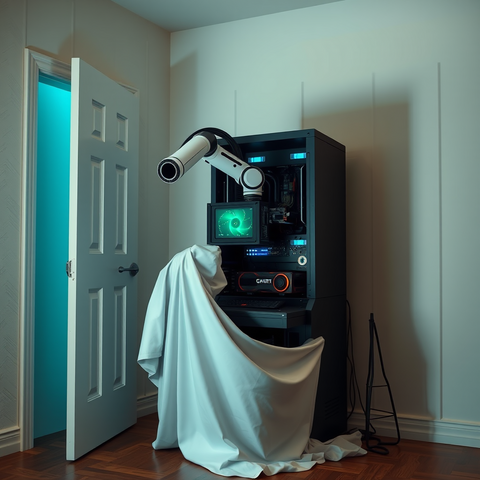
(This post is a followup to Unimatrix (Part 2)).
This was originally going to be about software, and I will definitely cover some of that in this post. It is also going to be about careful planning and restraint.
Just kidding, this is about the adventures of adding the fifth GPU to the system.
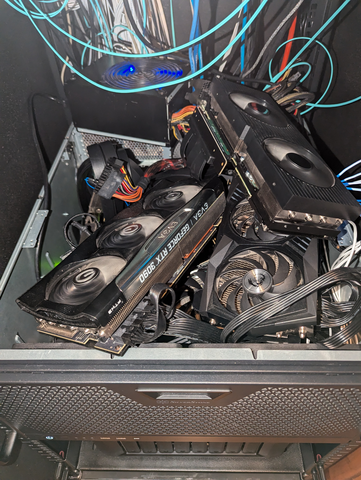
When we last left Unimatrix, I had installed the fourth GPU, and they were sort of haphazardly piled into the case. It was a careful sort of chaos, but chaos nonetheless.
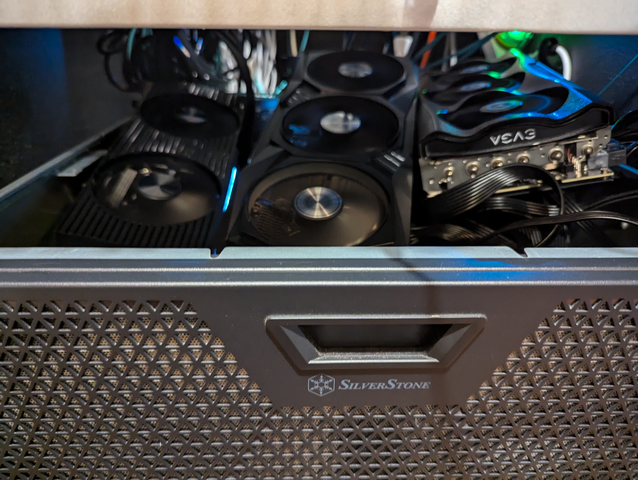
I tried to do something similar with the fifth one with less than stellar results.
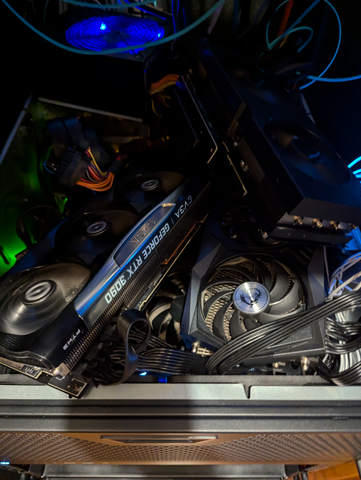
Clearly, I needed to rethink this a bit. I wanted to stand the cards up vertically, to provide room for all of them in a single plane. There wasn't really room above Unimatrix on the rack for this, so it sort of turned into a whole thing.
I had to rearrange things a bit on the rack. I hadn't taken the case out since I started installing things. It eh.. it is heavier now. I'm not sure on the total exact weight, but when I lost one side of it taking it off the rack rails to move them down a few RUs, it definitely left a mark on my leg.
Unimatrix's case has support and space for a second power supply, which is good. Unfortunately. it didn't have space for a third one, so that is just sitting on top of the case. The picture above looks haphazard and dangerous, but I was careful to not allow any shorts or fan obstructions. The airflow was good enough, temps on the GPUs didn't exceed 70c or so. Still, even I had to admit it looked junky.
I just shoved a jumper wire between the ground pin and power button detect pin on the 2nd and 3rd GPU. (Just to test it! I did fix this later..eventually). Unimatrix runs 24/7, so this was good enough for punk. I ordered a couple breakout boards to do this the "right" way. (If there is a "right" way to connect 5 consumer GPUs to a server motherboard).
I headed over to my preferred 3D model site and found these. Good enough for my purposes. I'll take five. Amusingly, I had allowed myself to get low on PETG, so I printed these in PLA instead. I'm sure it'll be fine.
Once all was said and done, I have the following:
Nvidia GTX 1080ti - 11gb
Plugged directly into the PCI-E slot. I removed the fan housing from it to make room on the side. It is the only thing currently powered by the tertiary power supply. (an old 500w pull from a disused system).
(2) Dell Nvidia RTX 3090 - 24gb each
Slotted into the PCI-E bay with PCI-Ex3 riser cables. These are plugged into the SPF secondary power supply. I like the form factor of these. If I could even-trade the MSI and EVGA cards for two more of these, I would in a heartbeat.
(1) MSI Nvidia RTX 3090 - 24gb
Plugged into another PCI-Ex3 riser cable and powered by the primary 1200w power supply.
(1) EVGA Nvidia RTX 3090 - 24gb
This one also has a x3 riser cable and is plugged into the main 1200w power supply.
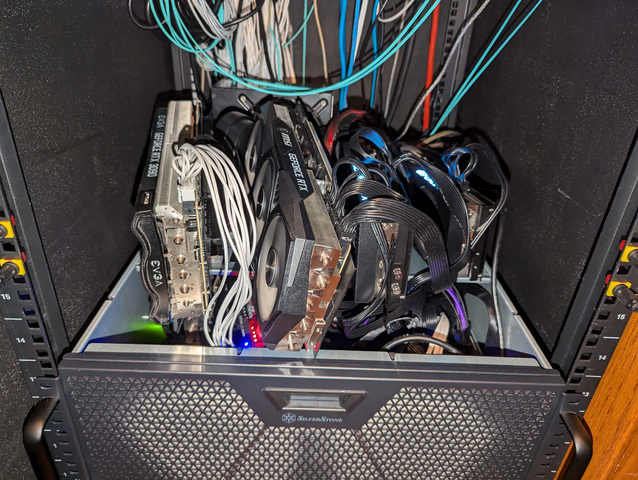
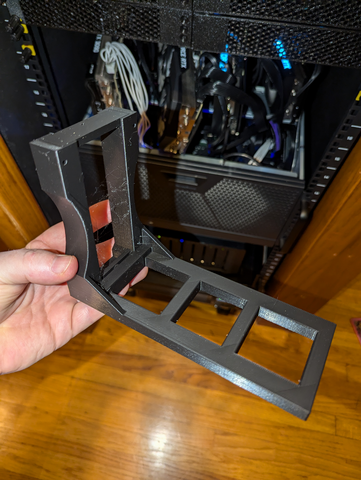
Sure was a good thing I searched for a 5u case I could fit consumer-sized GPUs into, eh? Anyways, once all was said and done, this was a nice sight to see after booting:
root@unimatrix:~# lspci | grep VGA
01:00.0 VGA compatible controller: NVIDIA Corporation GA102 [GeForce RTX 3090] (rev a1)
46:00.0 VGA compatible controller: ASPEED Technology, Inc. ASPEED Graphics Family (rev 41)
81:00.0 VGA compatible controller: NVIDIA Corporation GA102 [GeForce RTX 3090] (rev a1)
82:00.0 VGA compatible controller: NVIDIA Corporation GA102 [GeForce RTX 3090] (rev a1)
c1:00.0 VGA compatible controller: NVIDIA Corporation GP102 [GeForce GTX 1080 Ti] (rev a1)
c2:00.0 VGA compatible controller: NVIDIA Corporation GA102 [GeForce RTX 3090] (rev a1)
Some shots from the VMs themselves:
❯ ssh bob nvidia-smi
Fri Sep 27 10:33:20 2024
+---------------------------------------------------------------------------------------+
| NVIDIA-SMI 535.183.01             Driver Version: 535.183.01   CUDA Version: 12.2     |
|-----------------------------------------+----------------------+----------------------+
| GPU  Name                 Persistence-M | Bus-Id        Disp.A | Volatile Uncorr. ECC |
| Fan  Temp   Perf          Pwr:Usage/Cap |         Memory-Usage | GPU-Util  Compute M. |
|                                         |                      |               MIG M. |
|=========================================+======================+======================|
|   0  NVIDIA GeForce RTX 3090        On  | 00000000:01:00.0 Off |                  N/A |
| 30%   57C    P2             122W / 250W |  19534MiB / 24576MiB |      0%      Default |
|                                         |                      |                  N/A |
+-----------------------------------------+----------------------+----------------------+

+---------------------------------------------------------------------------------------+
| Processes:                                                                            |
|  GPU   GI   CI        PID   Type   Process name                            GPU Memory |
|        ID   ID                                                             Usage      |
|=======================================================================================|
|    0   N/A  N/A     16442      C   python                                    19528MiB |
+---------------------------------------------------------------------------------------+
Bob
zen@frigate:~$ nvidia-smi
Fri Sep 27 10:41:00 2024
+---------------------------------------------------------------------------------------+
| NVIDIA-SMI 535.183.01             Driver Version: 535.183.01   CUDA Version: 12.2     |
|-----------------------------------------+----------------------+----------------------+
| GPU  Name                 Persistence-M | Bus-Id        Disp.A | Volatile Uncorr. ECC |
| Fan  Temp   Perf          Pwr:Usage/Cap |         Memory-Usage | GPU-Util  Compute M. |
|                                         |                      |               MIG M. |
|=========================================+======================+======================|
|   0  NVIDIA GeForce GTX 1080 Ti     On  | 00000000:01:00.0 Off |                  N/A |
|  0%   71C    P2              70W / 125W |   8988MiB / 11264MiB |      1%      Default |
|                                         |                      |                  N/A |
+-----------------------------------------+----------------------+----------------------+

+---------------------------------------------------------------------------------------+
| Processes:                                                                            |
|  GPU   GI   CI        PID   Type   Process name                            GPU Memory |
|        ID   ID                                                             Usage      |
|=======================================================================================|
|    0   N/A  N/A      2096      C   python                                     6218MiB |
|    0   N/A  N/A     91481      C   ffmpeg                                      175MiB |
|    0   N/A  N/A     91490      C   ffmpeg                                      159MiB |
|    0   N/A  N/A     91508      C   ffmpeg                                      158MiB |
|    0   N/A  N/A     91519      C   ffmpeg                                      161MiB |
|    0   N/A  N/A     91524      C   ffmpeg                                      161MiB |
|    0   N/A  N/A     91537      C   ffmpeg                                      159MiB |
|    0   N/A  N/A     91543      C   ffmpeg                                      161MiB |
|    0   N/A  N/A     91546      C   ffmpeg                                      161MiB |
|    0   N/A  N/A     91552      C   ffmpeg                                      161MiB |
|    0   N/A  N/A     91560      C   ffmpeg                                      161MiB |
|    0   N/A  N/A     91572      C   ffmpeg                                      161MiB |
|    0   N/A  N/A     91573      C   ffmpeg                                      161MiB |
|    0   N/A  N/A     91577      C   ffmpeg                                      161MiB |
|    0   N/A  N/A     91586      C   ffmpeg                                      161MiB |
|    0   N/A  N/A     91594      C   ffmpeg                                      161MiB |
|    0   N/A  N/A   1987775      C   ffmpeg                                      161MiB |
|    0   N/A  N/A   2721010      C   ffmpeg                                      175MiB |
+---------------------------------------------------------------------------------------+
Frigate
zen@meg:~$ nvidia-smi
Fri Sep 27 10:41:54 2024
+---------------------------------------------------------------------------------------+
| NVIDIA-SMI 535.183.01             Driver Version: 535.183.01   CUDA Version: 12.2     |
|-----------------------------------------+----------------------+----------------------+
| GPU  Name                 Persistence-M | Bus-Id        Disp.A | Volatile Uncorr. ECC |
| Fan  Temp   Perf          Pwr:Usage/Cap |         Memory-Usage | GPU-Util  Compute M. |
|                                         |                      |               MIG M. |
|=========================================+======================+======================|
|   0  NVIDIA GeForce RTX 3090        On  | 00000000:01:00.0 Off |                  N/A |
| 32%   33C    P8              12W / 250W |  24166MiB / 24576MiB |      0%      Default |
|                                         |                      |                  N/A |
+-----------------------------------------+----------------------+----------------------+
|   1  NVIDIA GeForce RTX 3090        On  | 00000000:02:00.0 Off |                  N/A |
| 31%   30C    P8              17W / 250W |  24108MiB / 24576MiB |      0%      Default |
|                                         |                      |                  N/A |
+-----------------------------------------+----------------------+----------------------+
|   2  NVIDIA GeForce RTX 3090        On  | 00000000:03:00.0 Off |                  N/A |
|  0%   47C    P8              16W / 250W |  23022MiB / 24576MiB |      0%      Default |
|                                         |                      |                  N/A |
+-----------------------------------------+----------------------+----------------------+

+---------------------------------------------------------------------------------------+
| Processes:                                                                            |
|  GPU   GI   CI        PID   Type   Process name                            GPU Memory |
|        ID   ID                                                             Usage      |
|=======================================================================================|
|    0   N/A  N/A       869      C   python3                                   24160MiB |
|    1   N/A  N/A       869      C   python3                                   24102MiB |
|    2   N/A  N/A       869      C   python3                                   23016MiB |
+---------------------------------------------------------------------------------------+
Meg
You may have noticed the TPD of each card is limited. You are correct! See, even tho I have enough total wattage in the power supplies to deliver enough oompf to each of these cards, I still need to have a governor on the power.
With Nvidia cards in linux, this is fairly easy to do. The same tool I used above to display GPU allocation can also control the hardware's capabilities. I added these lines to the /etc/rc.local on each of the VMs with GPUs:
#!/bin/sh -e

nvidia-smi -pm 1
nvidia-smi -pl 250
nvidia-smi -gtt 75

exit 0
At boot, this script enables the power management on the cards, limits their total power draw to 250w (125 for the 1080), and sets a thermal limiter at 75c. The driver is smart enough to modulate the clock speed and power draw of the chip to maintain these limits without exceeding. So far, this has worked a treat.
This might seem like a bit of trouble. It is because of my house wiring.
If you do a quick bit of math, you can see that my GPUs can top out at around 1125w for all 5 combined. This is because the outlet the rack is plugged into can currently only supply 20 amps before popping the breaker. Further, my house only has 100a to split between everything, and to say "everything" consumes a lot of power would be more or less correct.
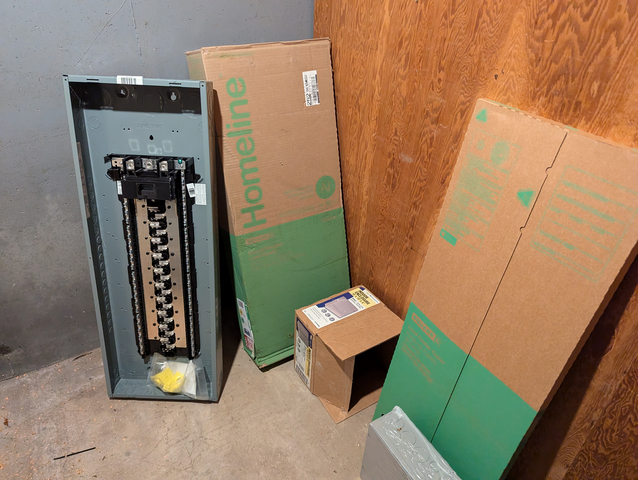
Thankfully, the electrician I hired to upgrade the house service to 200 amps also ran a new 30 amp outlet to my server closet.
Once these two upgrades are complete, I should be able to remove the governors and let the GPUs consume their full power. If nothing else, this should help a bit with my heating bill this winter.
I picked up a second 750w SPF power supply that I plan to install during the expected down time while my house power is offline during the upgrade. This should allow me to move (2) of the 3090s to each of the 750w power supplies, leaving the main 1200w power supply to run the rest of the system and, eventually, the RTX 5090 that will take the spot the 1080ti is in now.

Member discussion: