
I have often joked that I am not a proper musician, I just like to press buttons. This, of course, has bled into my other various hobbies. I have buttons around the house that do all manner of things. Some of those buttons make noise when I press them. It has happened, upon occasion, that whilst randomly pressing buttons, I made noises that - in retrospect - may have been nice to have saved. In order to solve this problem, I made a button that records music I already played.
It may come as a surprise that I do not care for the mixture of music and computers. I like electronic music well enough, and obviously I have several EPs of "AI Music" - what I mean is I don't like thinking about "computer stuff" when I am doing "music stuff". The two parts of my brain don't get along well. If I am being creative, I want to be creative, not fight with drivers and interconnects and return channels. I want to make music, not program a sequencer. There are definitely moments in my life when I enjoy programming, tinkering, and making two completely unrelated things talk to one another - that last one being a particular talent of mine - but not while I am rocking out.
It is because of this disconnect that my studio setup has always remained a bit of an anachronism in my house. I don't generally have a computer involved, I prefer old midi cables to usb, I prefer analog sounding synths vs digital ones, and I don't really care much for sound design, so I use a lot of stock sounds. VSTs never work quite right, and they all have some obtuse, non-intuitive interface, that often looks like someone threw up on their screen, took a picture, and added knobs.
I am not a hipster, I don't have a stick up my butt about "going dawless" or whatever the kids call it. I just don't want to do tech support during my creative time. Eliminating the PC from the setup was just an easy way to do it. I'll write more on my music setup in another article, this isn't about that. This is how I solved one problem that arises as a consequence of not having an easy PC setup. How do you save and organize the stuff worth keeping?
Years ago, I picked up a digital 12 channel mixer that could serve as a multitrack recorder was well. (The Tascam Model 12) This mixer allows to record directly from the board to SD card (or over USB if you are into that). You can do a stereo mixdown, or record separate tracks. The UI is fine, although a little clunky. This works okay for just saving stuff I know I want to keep. That isn't really how I make music, though. I'm not a sit down and compose symphonies kind of guy, I like to improvise, live loop, and whatnot when I play, so I don't usually know ahead of time what will be good. I don't want to record everything - it would be a nightmare to sort through and edit. More time sitting at a computer 'working' on music that isn't 'playing' music.
Sometimes you don't know that what you are making will be awesome until after you've heard it.
So how do I save stuff I didn't already know I'd want to keep?
Well, while I don't like using computers with music, I am a nerd. Yesterday, I did some thinking, some searching, and I built a solution.
Recently, I have begrudgingly been using a laptop as a midi routing device. I have a couple of devices that support USB midi but not DIN. Additionally, I like to switch what is controlling what from time to time. I had been looking into hardware to take this over for me, but the more I read up on the available options, the more I realized nothing was going to do exactly what I wanted.
Since I had the laptop in the loop already, I went looking for something that could just get out of the way. I know my tendencies, and I am unlikely to ever keep a system that requires reading words like ALSA and JACK and Pipewire while making music. I needed something that I could set and forget and would stay the fuck out of my way, and (of course) it needed to 'just work'.
My solution involved using Jack Capture. It is a small program that can monitor jackd's ports, and dump the audio to disk on demand. It also contained a 'time machine' component (original idea by Steve Harris) that records constantly to a buffer in ram, writing to disk only when asked.
I went with Jack Capture because it supported remote control (via the OSC protocol). I had worked briefly with OSC for another project, so I was already familiar with how it worked. This made it an easy choice.
/usr/bin/jack_capture -O 7777 --format mp3 --mp3 --filename-prefix /home/zen/jams/ --port system:capture_1 --port system:capture_2 --timemachine --timemachine-prebuffer 1000This enables OSC listening on port 7777, selects the output format (I'm not fancy), and a save location. The port selection is set to the main system's sound device, so whatever the laptop is hearing should be recorded. The timemachine option ensures that I have a full 15 minutes and change of buffer time. The laptop has plenty of ram.
This done, I wrote a script to execute it and a systemd service to enable it. If this is running all the time, it will always have the previous 15 minutes of audio buffered in memory. Now I just needed a way to trigger it while I was playing.
There is a simple command line program called 'oscsend' (it is in liblo-utils on debian, liblo-tools on ubuntu) that makes this quite easy. I wrote a few more scripts to set this up.
#!/bin/sh
oscsend achoo.local 7777 /jack_capture/tm/start
Simple enough, it connects to the osc server and sends the start recording command.
Here is another to stop recording:
#!/bin/sh
oscsend achoo.local 7777 /jack_capture/tm/stop
And finally, one to clear the buffer:
#!/bin/sh
oscsend achoo.local 7777 /jack_capture/stop
That last one actually kills the program, but my systemd service immediately restarts it. This way, if I am playing and decide I definitely do NOT want to keep whatever I just did, I can simply wipe it out and begin anew.
Now that I shell scripts, I'll need a way to fire them. I reached for my usual toolbag here. I added the following to my Home Assistant configuration and restarted it:
shell_command:
  music_desk_jam_stop: 'ssh -o StrictHostKeyChecking=no zen@achoo.local /home/zen/jam/jam_stop.sh'
  music_desk_jam_start: 'ssh -o StrictHostKeyChecking=no zen@achoo.local /home/zen/jam/jam_start.sh'
  music_desk_jam_clear: 'ssh -o StrictHostKeyChecking=no zen@achoo.local /home/zen/jam/jam_clear.sh'
This creates three services actions that tell jack_capture to begin writing the buffer to disk, stop, and clear the buffer, respectively.
That part done, I just made some buttons to display on a touchscreen accessible from my music desk:
          - show_name: true
            show_icon: true
            type: button
            tap_action:
              action: perform-action
              perform_action: shell_command.music_desk_jam_start
              target: {}
            entity: input_boolean.dummy
            name: Save Jam
            icon: mdi:bookmark-music
          - show_name: true
            show_icon: true
            type: button
            tap_action:
              action: perform-action
              perform_action: shell_command.music_desk_jam_stop
              target: {}
            entity: input_boolean.dummy
            name: End Recording
            icon: mdi:archive-music
          - show_name: true
            show_icon: true
            type: button
            tap_action:
              action: perform-action
              perform_action: shell_command.music_desk_jam_clear
              target: {}
            entity: input_boolean.dummy
            name: Trash Buffer
            icon: mdi:recycle
The end result looks something like this:
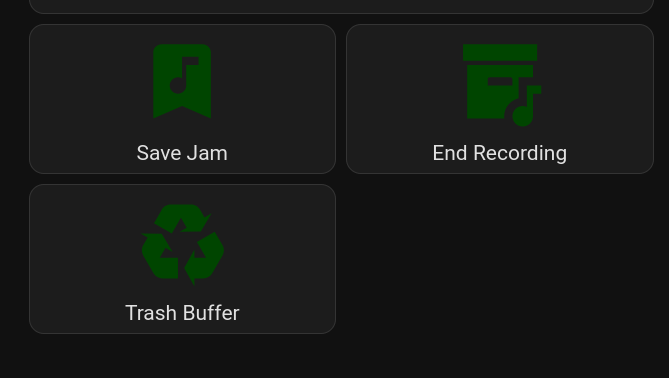
So while I am at my keyboards jamming, if I decide I like something I just played enough to keep, I tap the Save Jam button. This tells the laptop to write the last 15 minutes of audio to disk, and then keep recording until I tap the stop button. The audio will be saved as an MP3 in a place I can listen to it, edit it, whatever, later.
This allows me to keep my head in the creative mindset and continue making music, and worry about the recording, editing, trimming, etc later on.

Member discussion: